



The online portal has fault detection that works independently of the inverter manufacturer. Various types of fault detection are available to you. You can find the settings in the portal under Configuration => Fault detection.
Settings
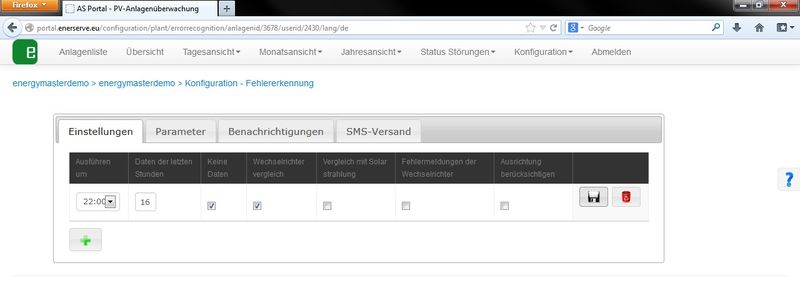
Job
A job is a single run of a fault detection.
You can create as many jobs as you like.
In the first column you can select when the fault detection (the job) should be run.
In the second column you specify which period, counting back from when the fault detection runs, should be analysed.
In this example, fault detection runs daily at 22:00 and takes the data of the last 16 hours into account.
In the remaining columns you specify which data should be analysed.
Example:
- You want to check in the morning whether all inverters are feeding in:
Run at: 10:00
Data of the last hours: 4
Enable “No data” - You want to check in the evening whether all inverters are performing equally:
Run at: 22:00
Data of the last hours: 16
Enable “Inverter comparison”
No data
The “No data” fault detection simply checks whether the inverter has produced at least 1 Wh during the specified hours. If this is not the case, a fault notification is sent.
Inverter comparison
The inverter comparison requires at least two inverters in the system or in the group. The DC power must be entered in the inverter configuration.
The inverter comparison compares all inverters in the system or in the groups with each other. The yields are first normalised to 1 kW.
If you have roofs with different orientations, we recommend setting up groups. Each group is then analysed separately.
Comparison with solar irradiance
The inverter comparison requires at least two inverters in the system or in the group. The DC power must be entered in the inverter configuration.
The inverter comparison compares all inverters in the system or in the groups with each other. The yields are first normalised to 1 kW.
If you have roofs with different orientations, we recommend setting up groups. Each group is then analysed separately.
Inverter error messages
You only receive the inverter error messages if the inverters are connected to the monitoring system via RS485 or LAN, as this is the only way we can read the inverter messages directly. Depending on the inverter, more or fewer status and error messages are output.
Take orientation into account
If you want orientation to be taken into account, you must enter the azimuth and the tilt in the
inverter configuration.
The azimuth is an angle and is specified in degrees (°). It
indicates by how many degrees the PV modules (module plane) deviate from the
optimum south-facing orientation.
Exact south-facing orientation = 0°
Example:
South-east orientation = e.g. -15°
South-west orientation = e.g. +15°
The tilt is the angle of inclination of the modules (roof pitch) (optimum = 30°).
The orientation is taken into account in the inverter comparison and in the comparison with solar irradiance.
Parameters
Inverter comparison
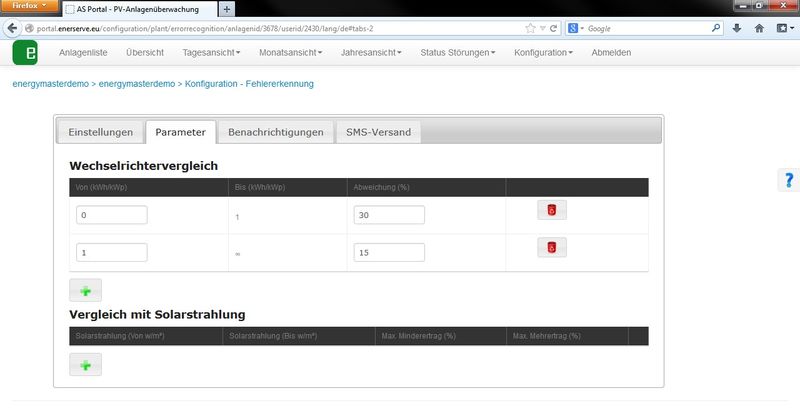
Here you can specify the maximum deviation in % depending on the relative output.
Example:
At low yields (fog, snow, persistent rain) the deviations are normally larger, so in our example a maximum deviation of 30% applies. In good weather the maximum deviation should be only 15%.
Parameter 1
- From (kWh/kWp): 0
- To (kWh/kWp): 1
- Deviation (%): 30
The comparison is only to be run if the relative yield is between 0 and 1 kWh/kWp.
Parameter 2
- From (kWh/kWp): 1
- To (kWh/kWp): ∞
- Deviation (%): 15
The comparison is only to be run from a relative yield of 1 kWh/kWp upwards.
Tip:
If you do not know which percentage to set, let the system run for a few days to see what might be sensible, and then calculate what the normal deviation in your system should be.
Comparison with solar irradiance
You can set the parameters in the same way as for the inverter comparison.
Notification
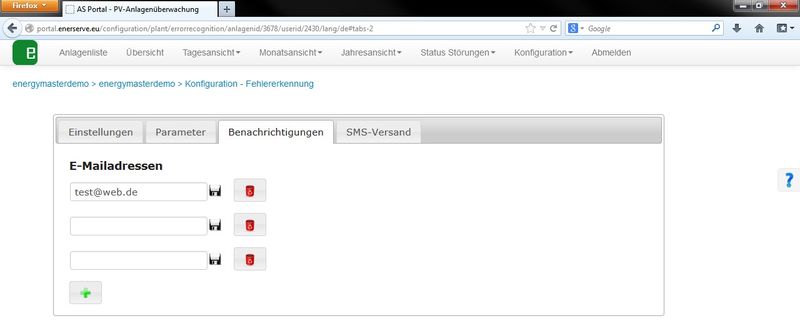
The email lists the inverters that have a fault.
SMS sending
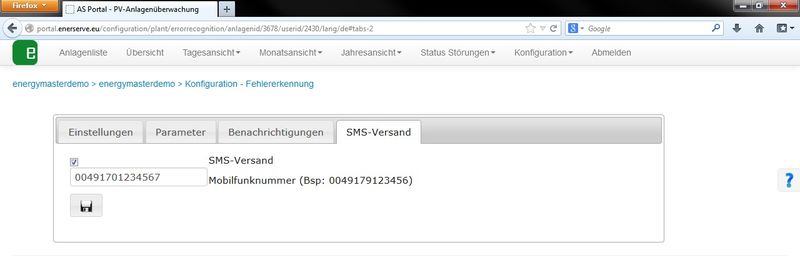
The mobile number must be entered as follows.
0049179123456
e.g. international dialling code 0049 for Germany. The leading zero of the area code is omitted.
Please enter digits only, NO + / – or spaces
If you do not enter your mobile number in the format shown here, no SMS notification can be sent!