



Data transmission to the enerserve portal is active by default and you do not need to configure anything.
FTP upload
Settings
The e.open.ftp interface describes the data protocol for regularly transmitting the measured values from the data logger to an FTP server.
The data is sent as a JSON file.
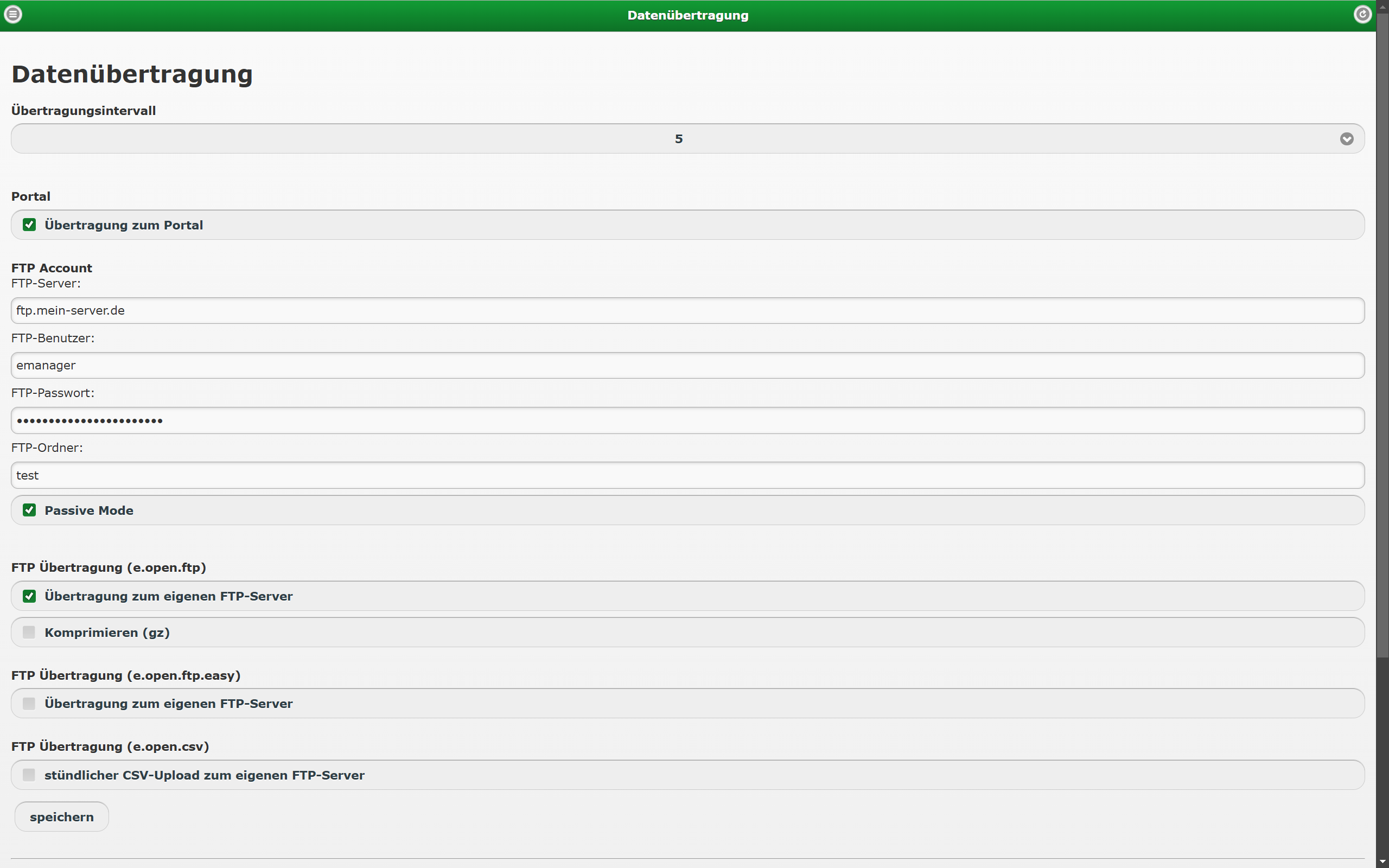
Activation
Here you can activate transmission to the FTP server.
FTP account
- FTP server
- FTP user
- FTP password
- FTP folder (optional)
- Passive / active mode
FTP transmission (e.open.ftp)
- Activate transmission to your own FTP server
- Compress (gz) (optional)
FTP account
- FTP server
- FTP user
- FTP password
- FTP folder (optional)
- Passive / active mode
FTP transmission (e.open.ftp)
- Activate transmission to your own FTP server
- Compress (gz) (optional)
e.open.ftp
Data is normally transmitted every 5 minutes. A JSON file (or, if compression is active, a zipped JSON file) is saved on the server.
If an FTP folder is specified, the file is saved in that folder; otherwise it is saved in the root directory.
The file name has the following format:
e.g. 1366713708_EMA120612345.json for a JSON file from 23.04.2013 12:41:48
e.g. 1366717009_EMA120612345.json.gz for a zipped JSON file from 23.04.2013 13:36:49
The FTP protocol does not acknowledge transmissions. Every data transmission causes the transmitted data to be marked as successfully sent in the data logger. If the file was damaged during transmission, this data is lost.
Description
e.open.ftp
Registration
A registration message is always sent when the device is restarted or an internet connection has been re-established,
e.g. because the GSM connection was interrupted.
{
"serial": "EMA123456789", // (String) Serial number of the monitoring device
"time": "2013-04-19 12:57:42", // (String) Time at which the device sent the file
"softwareversion": "0.5.3", // (String) Firmware version
"picsoftwareversion": "1.2.0", // (String) Firmware version of the second processor
"hardwareversion": "0.9.0", // (String) Hardware revision
"protocolversion": "1.0.1", // (String) Version of this JSON file
"remote": "enable", // (String) Remote Service [enable,disable,not installed]
"reception": "99", // (String) Signal strength for GSM/UMTS devices (-dBm)
"provider": "Vodafone", // (String) Provider
"lac": "514", // (String) Location ID
"cellid": "27511", // (String) Cell ID
"telefonnumber": "", // (String) Phone number
"request": [], // (String) Requests to the server (n/a for FTP)
"ipaddress": "192.168.2.10", // (String) IP address of the device
"macaddress": "02:80:AD:21:AB:8E", // (String) MAC address
"devicecounter": 0, // (Integer) Number of devices, always 0 for registration
"intervall": 5, // (Integer) Storage interval of the measured values, always 5
"datasets":[] // Array of data records, always empty for registration
}
Data transmission
Data transmission is normally carried out every 5 minutes. If no current data is available, no data transmission takes place.
A data transmission is always carried out on the hour.
{
"serial": "EMA123456789", // (String) Serial number of the monitoring device
"time": "2013-04-19 12:57:42", // (String) Time at which the device sent the file
"softwareversion": "0.5.3", // (String) Firmware version
"picsoftwareversion": "1.2.0", // (String) Firmware version of the second processor
"hardwareversion": "0.9.0", // (String) Hardware revision
"protocolversion": "1.0.1", // (String) Version of this JSON file
"remote": "enable", // (String) Remote Service [enable,disable,not installed]
"request": [], // (String) Requests to the server (n/a for FTP)
"ipaddress": "192.168.2.10", // (String) IP address of the device
"macaddress": "02:80:AD:21:AB:8E", // (String) MAC address
"devicecounter": 0, // (Integer) Number of devices, always 0 for registration
"status": [ // (String) Status messages of the logger (not
status messages of the inverter
{
"time": "2012-04-03 14:55:00", // (String) Time at which the event
occurred
"typ": 1, // (Integer) 2=Status, 3=Error, 4=Self-consumption, 5=Ripple control receiver, 6=Cos phi
"message": "Startup" // (String) Message
}
],
"intervall": 5, // (Integer) Storage interval of the measured values, always 5
"datasets": [ // Array of data records
{
"time": "2012-08-27 12:55:00", // (String) Timestamp of the measured value
"devices": [ //Array of inverters
{
"id": 18, // (Integer) ID of the inverter in the data logger
"serial": "kaco-1", // (String) Serial number of the inverter
"type": "Wechselrichter", // (String) Type [Wechselrichter,Solarsensor,Zelltemperatur, Eigenverbrauch,Resteinspeisung,Bezug, Rundsteuergerät,Erzeuger,Verbraucher, Wind,Temperatur]
"model": "390TL ", // (String) Inverter model
"port": "RS485 1", // (String) Connected port [RS485 1, RS485 2, RS485 3,
PIC,LAN 1, LAN 2, LAN 2, CAN]
PIC digital and analogue inputs
"busid": "1", //(String) ID on the connected port (for RS485: the RS485
ID of the inverter, for PIC: 1-8)
"name": "WR 1", // (String) Inverter name
"numbersofmodules": 12, //(Integer) Number of connected modules
"modulepower": 235, //(Float) Connected module power
"values": [ // Array of the inverter's measured values
{
"type": "EDEV", // (String) Type of measured value [edev: yield (mean over storage interval), SOLAR: solar irradiance (mean over storage interval), SOLARTEMP: cell temperature, UDC, IDC, UAC, IAC, DEVICETEMP: inverter temperature, ECONS: current power consumption (mean over storage interval), EREST: current surplus feed-in (mean over storage interval), EGET: current grid consumption (mean over storage interval), STATUS, ERROR, PAC current power (mean over storage interval), ETOTAL: total yield of the inverter since commissioning, RIPPLECONTROL]
"number": 0, //(Integer) Number for several measured values of the same type (e.g.: UAC1, UAC2, UAC3, IAC1, IAC2, IAC3 (3-phase))
"data": 1722.02193 // (Float) Measured value
},
{
"type": "PAC",
"number": 0,
"data": 20664.26316
},
{
"type": "UDC",
"number": 1,
"data": 635.663158
},
{
"type": "IDC",
"number": 1,
"data": 13.097368
},
{
"type": "UAC",
"number": 1,
"data": 232.242105
},
{
"type": "IAC",
"number": 1,
"data": 29.586842
}
],
"status": [ // Array of status messages
{
"time": "2012-01-03 14:55:00", //(String) Time at which the message occurred
"message": "MPT on" //(String) Status message
},
{
"time": "2012-01-03 14:56:00",
"message": "MPT off"
},
{
"time": "2012-01-03 14:58:00",
"message": "Power off"
}
],
"error": [] // Array of error messages (same structure as status messages)
},
{
"id": 19,
"serial": "kaco-2",
"type": "Wechselrichter",
"model": "390TL ",
"port": "RS485 1",
"busid": "2",
"values": [
{
"type": "EDEV",
"number": 0,
"data": 1722.02193
},
{
"type": "PAC",
"number": 0,
"data": 20664.26316
},
{
"type": "UDC",
"number": 1,
"data": 635.663158
},
{
"type": "IDC",
"number": 1,
"data": 13.097368
},
{
"type": "UAC",
"number": 1,
"data": 232.242105
},
{
"type": "IAC",
"number": 1,
"data": 29.586842
}
],
"status": [
{
"time": "2012-01-03 14:55:00",
"message": "MPT on"
},
{
"time": "2012-01-03 14:56:00",
"message": "MPT off"
},
{
"time": "2012-01-03 14:58:00",
"message": "Power off"
}
],
"error": []
},
{
"id": 2,
"serial": "1",
"type": "Resteinspeisung",
"model": "",
"port": "PIC",
"busid": "1",
"values": [
{
"type": "EDEV",
"number": 0,
"data": 0
},
{
"type": "PAC",
"number": 0,
"data": 0
}
],
"status": [],
"error": []
}
},
{
"time": "2012-08-27 13:00:00",
"devices": [
{
"id": 18,
"serial": "kaco-1",
"type": "Wechselrichter",
"model": "390TL ",
"port": "RS485 1",
"busid": "1",
"values": [
{
"type": "EDEV",
"number": 0,
"data": 1722.02193
},
{
"type": "PAC",
"number": 0,
"data": 20664.26316
},
{
"type": "UDC",
"number": 1,
"data": 635.663158
},
{
"type": "IDC",
"number": 1,
"data": 13.097368
},
{
"type": "UAC",
"number": 1,
"data": 232.242105
},
{
"type": "IAC",
"number": 1,
"data": 29.586842
}
],
"status": [
{
"time": "2012-01-03 14:55:00",
"message": "MPT on"
},
{
"time": "2012-01-03 14:56:00",
"message": "MPT off"
},
{
"time": "2012-01-03 14:58:00",
"message": "Power off"
}
],
"error": []
}
]
}
]
}
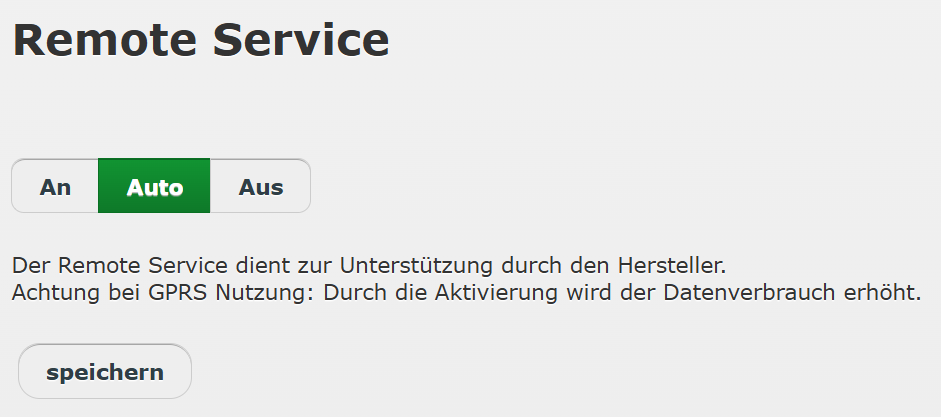
Remote service
On: The connection is permanently active.
Auto: The connection is established when required.
Off: The connection is deactivated.
The remote service is used to display live data in the portal and to allow our support team to access the device when needed and help with problems.
If the remote service is deactivated, the connection is permanently disabled. Technical assistance from our support team is then no longer possible!