



The e.manager offers 2 different methods for zero feed-in at the grid connection point (GCP).
Permanent feed-in limitation and feed-in limitation during a power reduction. Only one of the two methods can be active at a time.
Requirements
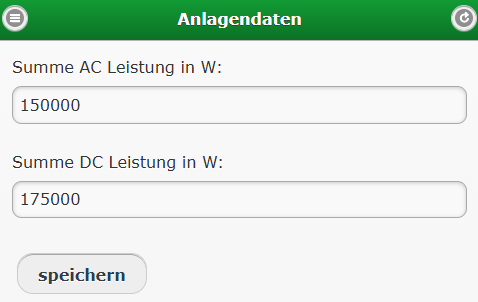
1. System data
Under Configuration => System data, enter the connected DC power in W and the AC power in W of all inverters.
2. Meter at the GCP
A meter must be installed at the GCP. It should be connected to the e.manager via RS485 or LAN.
Permanent reduction
You can activate the permanent reduction under Configuration => 70 percent rule.
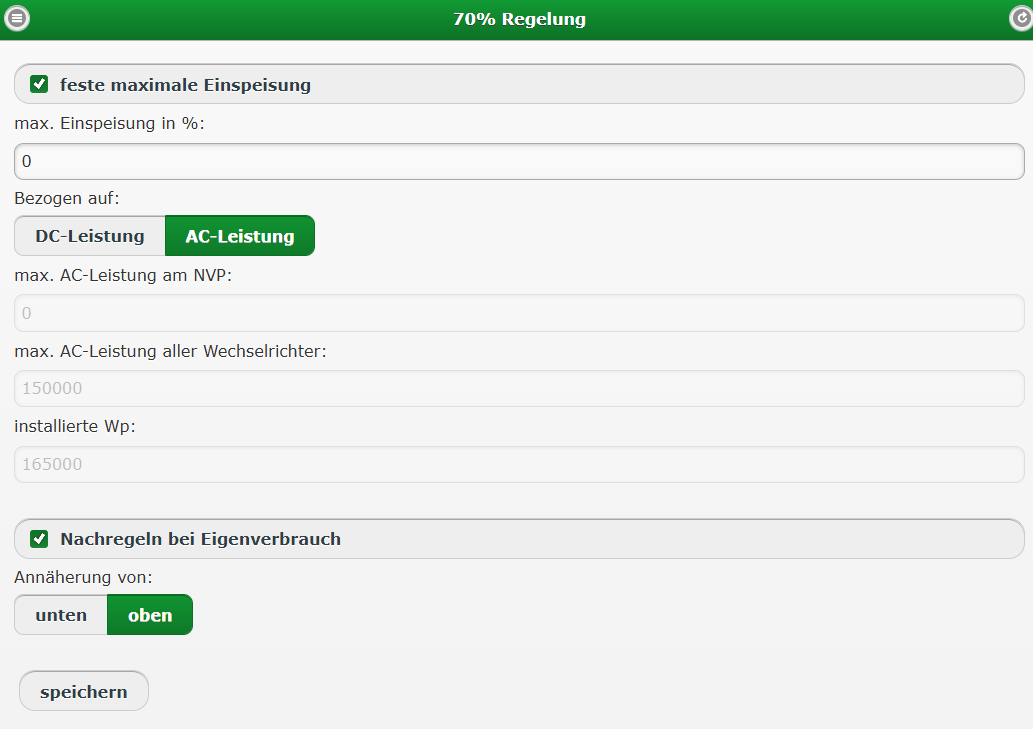
Parameters
Max. feed-in in %: e.g. 70%, or 0% if no feed-in is required
Max. AC power of all inverters: you can enter this value under Configuration => System data
Installed Wp:
Readjust for self-consumption: enable. In this case, the inverter output is readjusted.
0% at the GCP during a power reduction
In the event of a power reduction by the grid operator or the direct marketer, the e.manager can implement the power setpoint at the GCP. You can activate the settings under Configuration => Power reduction => Self-consumption.
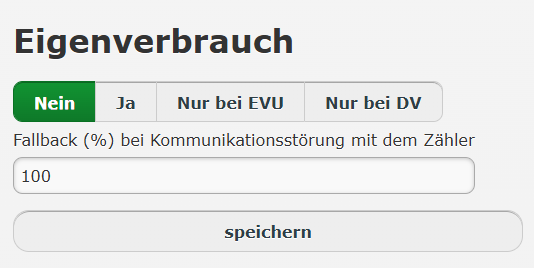
If self-consumption is to be taken into account during power control by the energy supply company (ESC) or the direct marketer (DM), you can activate this here. In this case, for example, the inverters are not limited to 0%; instead, 0% is controlled at the GCP.
No: In the event of a reduction, the inverters are controlled directly.
Yes: The power is controlled at the GCP, regardless of whether the setpoint comes from the ESC or the DM.
ESC only: Control at the GCP is only active if the setpoint comes from the ESC.
DM only: Control at the GCP is only active if the setpoint comes from the DM.
Fallback (%) in the event of a communication fault with the meter:
If the meter at the GCP fails for longer than 5 minutes, the system is limited to the value specified. As a rule, this should be set to 0%.
A meter at the GCP is required for this function.
The AC and DC power must be entered under Configuration => System data.