


Here you can manage tokens that other programs and devices – such as a Node-RED flow – use to access the API of this SmartPi.
Unlike your own login, a token never expires here, so that the tokens in the Node-RED modules do not have to be renewed. To revoke access, simply delete the token.
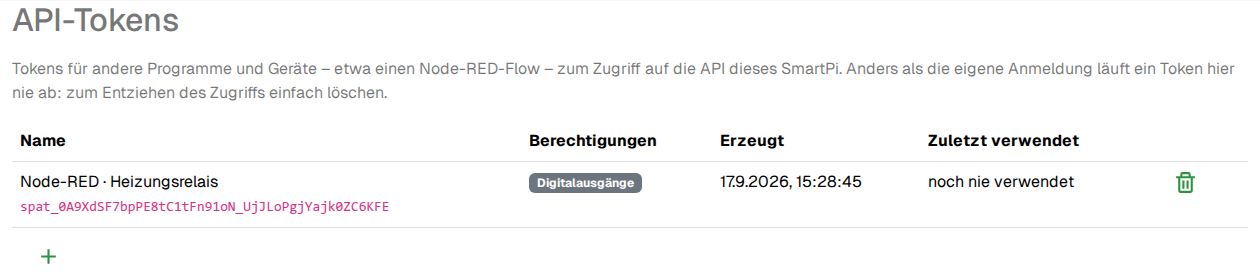
The table shows the name, permissions, creation date and last use of each token. The token itself (the secret access string) is always shown in plain text in the list – there is no separate “Copy now, it will never be shown again” dialog.
Use the plus symbol to create a new token:
- Name: a label for your own reference, e.g.
Node-RED · Heating relay. - Permissions (several can be ticked):
- Digital outputs – switch digital outputs.
- Analogue output (4-20mA) – control the 4-20mA analogue output.
- Analogue input (4-20mA / 0-10V) – read analogue inputs.
- Read configuration – retrieve the device configuration.
- Change configuration – change the device configuration.
- Network settings – change network settings.
- I2C bus scan – scan the I2C bus.
Example: a token for heating control via Node-RED usually only needs Digital outputs – do not grant more rights than are actually needed.
To revoke access, simply click the bin symbol in the row (with a confirmation prompt) – the program using this token will stop working immediately.